The Truth About the Netgear Nighthawk M7 Pro 5G Router: Pros, Cons, and Verdict
The landscape of mobile computing has undergone a radical transformation over the last decade. While laptops have become more powerful and efficient, the bottleneck for professionals, digital nomads, and remote workers has often remained the same: reliable, high-speed connectivity. For many, public Wi-Fi is a security risk, and tethering to a smartphone is a battery-draining compromise that rarely provides the stability needed for serious productivity. Enter the Netgear Nighthawk M7 Pro (MR7500), a device designed to bridge the gap between the desktop fiber experience and the mobile lifestyle. As the latest flagship in Netgear’s storied line of mobile hotspots, the M7 Pro promises to harness the full potential of 5G Sub-6 and mmWave technologies to deliver a connectivity solution that rivals wired home broadband.
This article provides an exhaustive analysis of the Netgear Nighthawk M7 Pro, examining its architecture, real-world performance, and suitability for various user profiles. In an era where "always-on" is a requirement rather than a luxury, we look beneath the marketing materials to find the truth about whether this premium piece of hardware justifies its substantial price tag.
Understanding the Mobile Router Paradigm Shift
To understand why the Nighthawk M7 Pro matters, one must first understand the limitations of the current mobile connectivity ecosystem. Most laptop users rely on one of three methods for internet access on the go: public hotspots, integrated LTE/5G modules within their laptops, or smartphone tethering. Each has significant drawbacks. Public hotspots are notoriously insecure and often heavily throttled. Integrated laptop modems are rare and often tie a user to a specific carrier or hardware generation. Smartphone tethering, while convenient, lacks advanced antenna arrays and often leads to thermal throttling and rapid battery depletion on the host phone.
A dedicated mobile router like the M7 Pro is a specialized tool. It features its own dedicated processor, high-gain antennas, and a robust battery. More importantly, it functions as a full-fledged router, offering features like hardware-level firewalls, VPN passthrough, and the ability to connect dozens of devices simultaneously without degrading the performance of the host machine. For the modern professional using a high-end laptop, the M7 Pro is essentially an external networking card that provides the stability of a home office in any location with a cellular signal.
In-Depth Product Analysis: The M7 Pro Architecture
The Nighthawk M7 Pro is built upon the Qualcomm Snapdragon X75 5G Modem-RF System. This is a critical distinction, as the X75 is engineered for enhanced power efficiency and superior signal retention in fringe areas. Unlike its predecessors, the X75 allows for better aggregation of 5G frequencies, meaning the M7 Pro can "combine" different lanes of the cellular highway to achieve faster speeds even when the network is congested.
Wireless Capabilities and Wi-Fi 7
One of the headline features of the M7 Pro is its support for Wi-Fi 7 (802.11be). While many portable hotspots still linger on Wi-Fi 6 or 6E, the move to Wi-Fi 7 provides a significant boost in local network speeds. Wi-Fi 7 introduces Multi-Link Operation (MLO), which allows the M7 Pro to communicate with a laptop over multiple bands (2.4GHz, 5GHz, and 6GHz) simultaneously. This reduces latency—a crucial factor for video conferencing and remote desktop applications—and ensures that even if one band is saturated with interference, the connection remains stable.
For laptop users, this means that the wireless link between the computer and the hotspot is no longer the bottleneck. Even if the cellular network is delivering 2Gbps speeds, a Wi-Fi 7 connection can comfortably pass that data through to the laptop without the overhead or congestion issues found in older Wi-Fi standards.
Physical Design and User Interface
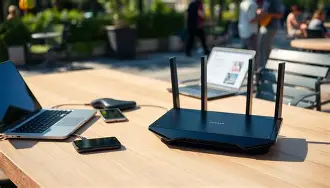
The device maintains the classic Nighthawk "squircle" shape but feels more ruggedized than previous iterations. The centerpiece is a 2.8-inch color touch screen. This interface is not just for show; it allows users to monitor data usage in real-time, view signal strength across different bands, manage connected devices, and adjust settings without needing to log into a web-based portal. This is particularly useful for travelers who need to quickly check if they are nearing their data cap or if they need to adjust the Wi-Fi range to save battery life.
On the rear, the M7 Pro includes a 2.5Gbps Ethernet port. This is a game-changer for professional setups. It allows the hotspot to act as the primary WAN source for a larger fixed router or provides a high-speed wired connection directly to a laptop, bypassing Wi-Fi altogether for the absolute lowest possible latency and highest security.
Shop the latest Laptops & Computers picks on Amazon.
Browse Now →Real-World Use Cases
Buying a device like the Nighthawk M7 Pro is an investment in productivity. To see where it fits, let’s look at how different professionals might utilize its feature set.
The Traveling Executive and Creative Professional
For a creative professional editing video on a MacBook Pro or a high-end Windows workstation, the need for data is immense. Uploading 4K proxies or downloading large asset libraries from a cloud server requires more than just "basic" internet. The M7 Pro’s ability to tap into 5G mmWave—where available—can provide multi-gigabit speeds that rival office-based fiber. In these scenarios, the M7 Pro acts as a portable studio hub, allowing the laptop to maintain a high-speed connection while also providing internet to tablets, cameras, and external storage devices.
The Emergency Services and Remote Site Management
In industries like construction or emergency response, internet access is often non-existent. The M7 Pro includes two TS-9 connectors for external antennas. By attaching high-gain directional antennas, users can pull in signals from towers miles away that a standard smartphone would simply miss. When paired with the 2.5Gbps Ethernet port, the M7 Pro can power a small mobile office, providing a reliable link for site reports, blueprints, and VoIP communication.
The "Work from Anywhere" Digital Nomad
Digital nomads often find themselves in Airbnbs or cafes with lackluster Wi-Fi. The M7 Pro offers a "Data Offloading" feature. This allows the hotspot to connect to an existing Wi-Fi network and rebroadcast it as a private, secure network. This adds a layer of encryption and firewall protection between the public network and the user’s laptop, while also saving cellular data when a usable (if slow) Wi-Fi source is available.
Comparison Table: M7 Pro vs. Previous Generations
To understand the leap in technology, it is helpful to compare the M7 Pro with its predecessors, the M6 and M6 Pro.
| Feature | Nighthawk M6 | Nighthawk M6 Pro | Nighthawk M7 Pro |
|---|---|---|---|
| 5G Modem | Qualcomm X62 | Qualcomm X65 | Qualcomm X75 |
| Wi-Fi Standard | Wi-Fi 6 | Wi-Fi 6E | Wi-Fi 7 |
| Ethernet Port | 1Gbps | 2.5Gbps | 2.5Gbps |
| Peak 5G Speed | Up to 2.5Gbps | Up to 4Gbps | Up to 6Gbps+ |
| Max Devices | 32 | 32 | 64 |
| Antenna Support | Sub-6 5G | Sub-6 & mmWave | Sub-6 & Advanced mmWave |
Pros and Cons
Despite its impressive specifications, any piece of technology involves trade-offs. Here is a breakdown of the advantages and drawbacks of the Netgear Nighthawk M7 Pro.
Pros
- Future-Proof Connectivity: By including Wi-Fi 7 and the Snapdragon X75 modem, this device is built to stay relevant for several years as carrier networks continue to upgrade.
- Versatile Power Modes: The device can run on its battery for mobility or be plugged into a wall outlet. Crucially, the battery can be removed when using AC power to prevent heat buildup and battery degradation.
- Superior Security: Unlike public Wi-Fi, the M7 Pro offers a private, WPA3-encrypted network with a built-in firewall, making it safe for handling sensitive corporate data.
- Global Compatibility: It supports a wide array of international 5G and 4G LTE bands, making it an ideal companion for international business travel (provided it is the unlocked version).
- Enterprise-Grade Hardware: The inclusion of the 2.5Gbps Ethernet port and external antenna ports makes it more than just a consumer gadget; it is a legitimate networking tool.
Cons
- High Entry Cost: The M7 Pro is one of the most expensive mobile hotspots on the market, often costing as much as a mid-range laptop itself.
- Carrier Restrictions: In many regions, the M7 Pro is sold through specific carriers (like AT&T in the US), which may come with bloatware or locked firmware that prevents use with other SIM cards without significant effort.
- Thermal Management: Under heavy 5G mmWave usage or when serving many clients, the device can become quite warm. While it has internal cooling mechanisms, extreme environments can lead to speed throttling.
- Battery Life: While the 5040mAh battery is substantial, high-speed 5G and Wi-Fi 7 are power-hungry. Users should expect 6-9 hours of real-world use, meaning a power bank is often necessary for long workdays.
Buying Guide: Is the M7 Pro Right for You?
Before investing in the Nighthawk M7 Pro, laptop users should evaluate their specific needs. Not everyone requires the "Pro" level of performance, and for some, the standard M6 or even a high-quality smartphone may suffice. Use the following criteria to determine if you should make the leap.
Assess Your Location
The M7 Pro shines in areas with "Ultra Wideband" or mmWave 5G coverage. If you live or work in an area where 5G is still in its infancy or only basic "Low Band" 5G is available, you will not see the full benefit of the X75 modem. Use carrier coverage maps to see if the places you frequent support the high-frequency bands that this device is designed to exploit.
Evaluate Your Hardware
To get the most out of Wi-Fi 7, your laptop needs a Wi-Fi 7 card. While some 2024 and 2025 model year laptops (like those featuring Intel Core Ultra or high-end Snapdragon X Elite chips) include these, many older machines do not. You will still get a great connection with a Wi-Fi 6 laptop, but you won't experience the lowest possible latency and the MLO features that define the Wi-Fi 7 standard.
Looking for the best Laptops & Computers deals on Amazon?
Shop Amazon →Consider Data Plans
A flagship router is useless without a flagship data plan. The M7 Pro can consume gigabytes of data in minutes during a speed test or a large file download. Ensure that your carrier offers a "true" unlimited plan or a very high data cap. Many "unlimited" plans throttle speeds after 50GB or 100GB, which can be reached quickly when using this device as a primary home-office replacement.
Portability vs. Stability
If you only need internet for browsing and email while waiting for a flight, your phone's hotspot is sufficient. If you need to participate in three-hour Zoom marathons while simultaneously running a VPN and accessing a remote server, the M7 Pro is the tool for the job. The stability of the connection is its primary selling point.
Integration with Laptop Workflows
For the laptop user, the M7 Pro is more than just a puck that gives off a Wi-Fi signal. Modern operating systems like Windows 11 and macOS treat connections differently based on whether they are "metered." The M7 Pro allows you to designate the connection as non-metered, ensuring that background tasks and sync services (like OneDrive or iCloud) continue to function exactly as they would at home. This seamless transition is vital for maintaining a consistent workflow.
Furthermore, because the M7 Pro handles all the heavy lifting of signal processing and routing, your laptop’s CPU and Wi-Fi card don’t have to work as hard to maintain a weak signal. In many cases, using a dedicated hotspot can actually extend your laptop’s battery life compared to using its internal cellular modem or tethering to a phone, as the Wi-Fi connection to a device inches away is much more efficient than the laptop's modem struggling to talk to a tower miles away.
Conclusion: The Verdict on the M7 Pro
The Netgear Nighthawk M7 Pro represents the current pinnacle of mobile broadband technology. It is a specialized, high-performance instrument designed for a specific subset of the population: those whose income depends on having the fastest, most stable internet connection possible, regardless of where they are. By integrating the Snapdragon X75 modem and Wi-Fi 7, Netgear has created a device that is not only the fastest available today but is also equipped to handle the network advancements of the next several years.
However, the "Truth" about the M7 Pro is that it is overkill for the average consumer. For the casual traveler or the student, the high cost is difficult to justify when compared to the perfectly capable M6 or even a modern smartphone. The M7 Pro is clearly aimed at the "Pro" in its name—the power users, the technical professionals, and the organizations that require mission-critical connectivity.
If you occupy that professional space, the M7 Pro is arguably the best mobile router ever made. Its combination of raw speed, physical connectivity via 2.5Gbps Ethernet, and advanced Wi-Fi 7 features makes it an unrivaled companion for a high-end laptop. While the price is high and the battery life requires management, the peace of mind that comes from knowing you have the best possible connection in your pocket is, for many, worth every penny. It is a rare example of a product that actually delivers on its ambitious technical promises, provided the user has the infrastructure and the need to support it.