Don't Buy the Netgear Nighthawk M7 5G Router Until You Read This Full Analysis
The quest for reliable, high-speed internet while on the move has transformed from a luxury for digital nomads into a necessity for modern professionals. As cellular technology transitions from the established 4G LTE era into the robust capabilities of 5G Sub-6GHz and mmWave, hardware manufacturers are racing to provide devices that can handle these increased bandwidths. Enter the Netgear Nighthawk M7 (MR7400), a device positioned as a premium gateway for those who refuse to settle for the spotty performance of smartphone hotspots. However, at its significant price point, the M7 is not an impulse purchase. It is a specialized tool that requires a specific set of needs to justify its inclusion in a laptop bag.
Mobile routers are often overlooked in the laptop ecosystem, yet they are the backbone of a successful remote workstation. While modern laptops like the MacBook Pro or the Dell XPS 13 offer incredible processing power, their utility is halved without a stable connection. Public Wi-Fi in airports, hotels, and cafes is notorious for congestion, latency, and security vulnerabilities. The Nighthawk M7 promises to mitigate these issues by providing a dedicated, secure, and lightning-fast 5G environment. But before hitting the checkout button, potential buyers must understand the nuances of its performance, its battery life under heavy load, and how it differentiates itself from its predecessors and competitors.
Understanding the Architecture of the Nighthawk M7
At its core, the Netgear Nighthawk M7 is powered by the Qualcomm Snapdragon X75 5G Modem-RF System. This is a critical distinction because the modem identifies the device's ceiling for theoretical speeds and its efficiency in managing signal handoffs. The X75 is designed for the next phase of 5G, supporting features like carrier aggregation that allow the device to "bond" multiple cellular bands together for a wider data pipe. For a laptop user, this translates to fewer dropped frames during a Zoom call and faster downloads of multi-gigabyte project files.
The device supports Wi-Fi 7 technology, though it is important to note that many laptops currently in the field are still utilizing Wi-Fi 6 or 6E. This makes the M7 a forward-looking investment. Wi-Fi 7 introduces Multi-Link Operation (MLO), which allows a laptop to send and receive data across different frequency bands simultaneously. Even if a user's current laptop doesn't support Wi-Fi 7, the M7’s ability to broadcast in 2.4GHz, 5GHz, and 6GHz ensures that the local wireless environment is as clean and interference-free as possible.
Performance in the Real World
Specifications on a box rarely tell the full story of mobile networking. In practical testing across various urban and suburban environments, the M7 demonstrates why dedicated hardware beats a smartphone hotspot. Smartphones are designed to prioritize voice calls and battery preservation for OS background tasks; the M7 is designed solely to move data. When connected to a 5G Mid-Band network (often labeled as 5G+ or 5G UC), the M7 can consistently deliver speeds exceeding 400 Mbps, provided the cellular infrastructure is adequate.
For laptop users, the most significant advantage is the inclusion of a dedicated 2.5Gbps Ethernet port. This feature is often ignored by casual users but is a game-changer for professionals. By tethering a laptop directly to the M7 via Ethernet, one bypasses the inherent latency of wireless communication entirely. This is particularly beneficial for video editors working off cloud storage or gamers who require the lowest possible "ping" while traveling. Furthermore, the Ethernet port allows the M7 to function as a failover modem for a home or office network. If a primary fiber line goes down, the M7 can be plugged into a main router to restore connectivity to an entire building.
Physical Design and User Interface
The M7 retains the familiar rugged, square aesthetic of the Nighthawk mobile line. It features a 2.4-inch color touch screen that provides immediate data on signal strength, data usage, and connected devices. For many, this interface is the primary way they will interact with the device. It allows for quick adjustments to Wi-Fi settings or the creation of a guest network without needing to log into a web-based dashboard on a laptop. The touch response is adequate, though it can feel slightly sluggish compared to modern smartphone screens.
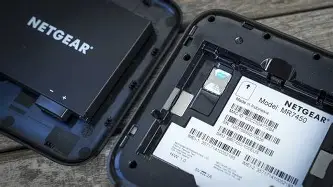
Underneath the removable back cover lies a 5040mAh battery. While this capacity is substantial, the power demands of 5G and Wi-Fi 7 are non-trivial. Under heavy use—such as a laptop performing a system update while a tablet streams 4K video—the battery life typically lands between 5 and 8 hours. For a full workday, users will likely need to keep the device plugged into a USB-C power source. Netgear has included a "Power Boost" mode that increases Wi-Fi coverage area when the device is plugged in, effectively transforming it from a pocketable hotspot into a legitimate portable travel router.
Shop the latest Laptops & Computers picks on Amazon.
Browse Now →Who is the Nighthawk M7 For?
The market for a high-end 5G router is narrower than it appears. It is essential to categorize use cases to determine if the M7 is a necessary tool or an expensive overkill. The primary demographic consists of field professionals: engineers, architects, and media creators who work in locations where traditional high-speed internet is unavailable. For these users, the ability to connect multiple devices (up to 32) without degrading the laptop's performance is paramount.
Another key group is the "Extreme Traveler." If a user spends a significant portion of their year in hotels, the M7 offers a consistent security layer. Instead of reconfiguring Every device—laptop, tablet, Kindle, and smartphone—to a new hotel Wi-Fi every two nights, they simply turn on the M7. This creates a "Personal Area Network" (PAN) where all devices stay connected to each other, allowing for seamless file sharing via AirDrop or local network transfers even when the internet is offline.
The Comparison Context
To understand the M7's value, it must be viewed against its predecessor, the M6, and its more powerful sibling, the M7 Pro. The standard M7 sits in a sweet spot for portability and performance, but it faces stiff competition from the rise of 5G-integrated laptops. However, integrated 5G in a laptop is often tied to that specific machine's lifespan. If the laptop is upgraded, the 5G module goes with it. The M7 remains a versatile, independent asset that serves any hardware brought into its orbit.
| Feature | Nighthawk M7 (MR7400) | Nighthawk M6 (MR6150) | Typical 5G Smartphone |
|---|---|---|---|
| 5G Modem | Qualcomm Snapdragon X75 | Qualcomm Snapdragon X62 | Varies (X65-X75) |
| Wi-Fi Standard | Wi-Fi 7 (Up to 5.8Gbps) | Wi-Fi 6 (Up to 3.6Gbps) | Wi-Fi 6/6E |
| Ethernet Port | 2.5Gbps Dedicated | 1Gbps Dedicated | None |
| Max Devices | 32 Devices | 32 Devices | 5-10 (Throttled) |
| External Antenna | TS-9 Ports (Dual) | TS-9 Ports (Dual) | None |
Comprehensive Pros and Cons
Evaluating the Nighthawk M7 requires weighing its top-tier engineering against its logistical requirements. It is a device of extremes, offering the fastest possible mobile speeds while demanding a premium in terms of cost and power management.
- Pro: Cutting-Edge Connectivity. The inclusion of Wi-Fi 7 and the Snapdragon X75 modem ensures that the device will remain relevant for several years as carriers continue to upgrade their towers.
- Pro: Exceptional Throughput. With a 2.5Gbps Ethernet port, it is one of the few mobile hotspots that can truly replace a home cable modem in an emergency or in remote work scenarios.
- Pro: Security Control. Unlike public Wi-Fi, the M7 provides a private firewall, VPN pass-through support, and WPA3 encryption, which are critical for protecting sensitive corporate data on a laptop.
- Con: Price Point. The M7 is significantly more expensive than entry-level 5G hotspots or even some budget-friendly laptops. The ROI is only clear for heavy data users.
- Con: Battery Drainage. Operating on the 6GHz band (Wi-Fi 6E/7) and 5G simultaneously is power-intensive. Users should not expect it to last a 12-hour international flight without a power bank.
- Con: Thermal Management. Under sustained high-speed data transfers, the unit can become quite warm. It is best kept in an open air environment rather than buried deep in a backpack during operation.
- Con: Size and Weight. While portable, it is a "hefty" puck. For ultralight travelers who count every gram, the added weight of the M7 and its charging cables must be considered.
Buying Guide: Is the M7 Right for You?
Before purchasing the Netgear Nighthawk M7, consider the following factors to ensure it matches your workflow and technical environment.
1. Your Carrier's 5G Infrastructure
A 5G router is only as good as the signal it receives. If you primarily work in areas where 5G is merely "rebranded 4G" (Low-Band 5G), you will not see a significant performance boost over the older, cheaper M6 model. The M7 shines in areas with Mid-Band or mmWave coverage. Research the coverage maps of your intended provider, specifically looking for high-capacity bands like N41 (T-Mobile) or N77 (Verizon/AT&T).
2. The "In-Home" Use Case
Are you looking for a device that stays in your laptop bag, or do you need it to double as a home router? If you live in a rural area where Starlink or Fiber isn't an option, the M7's "Home Router Mode" is a major selling point. By removing the battery and plugging it into a constant power source, you prevent battery swelling and can use the Ethernet port to feed a mesh Wi-Fi system. This versatility adds significant value to the high price tag.
3. Connectivity Needs of Your Laptop
Assess your current laptop. If you are using an older machine that only supports Wi-Fi 5 (802.11ac), the Wi-Fi 7 capabilities of the M7 will be wasted on you in the short term. However, if you plan to upgrade your laptop within the next 12 to 18 months, the M7 is a "future-proof" purchase. Additionally, if your laptop lacks an Ethernet port (common in modern MacBooks and Ultrabooks), consider whether you are willing to carry a USB-C to Ethernet adapter to take advantage of the M7's highest possible speeds.
Find top-rated Laptops & Computers products at great prices.
See Deals →4. Data Plan Costs
A premium router requires a premium data plan. High-speed 5G data can be expensive, and many "unlimited" smartphone plans heavily throttle hotspot usage. To get the most out of the M7, you will likely need a dedicated data-only SIM card with a high or truly unlimited data cap. Factor the monthly cost of this plan into your overall budget beyond the initial hardware purchase.
Advanced Troubleshooting and Optimization
For those who decide to invest in the M7, optimization is key. One of the most powerful features of the Nighthawk series is the inclusion of TS-9 external antenna ports. In fringe signal areas—such as a remote cabin or the interior of a lead-shielded office building—connecting a MIMO (Multiple Input, Multiple Output) external antenna can dramatically stabilize a connection. Laptop users should consider keep a small set of clip-on antennas in their bag for such occasions.
Furthermore, the M7 allows for "band locking" through its advanced web interface (accessible via a browser on your laptop). This allows technical users to force the device to stay on a faster, less congested 5G band rather than letting it automatically drift to a slower, stronger 4G signal. This level of control is exactly why professional users choose the Nighthawk line over simpler, carrier-branded "pebble" hotspots.
The Verdict: A Specialized Powerhouse
The Netgear Nighthawk M7 is undeniably a triumph of mobile networking engineering. It successfully bridges the gap between the speed of a fixed fiber line and the portability required for a modern laptop-based lifestyle. Its use of the latest Qualcomm silicon and Wi-Fi 7 ensures it is not a device that will be obsolete by next year. For the professional who loses money every minute their internet is down, or for the traveler who requires the highest level of security and speed, the M7 is a justifiable expense.
For the average user who only needs occasional internet access for checking emails or casual browsing at a local park, a smartphone hotspot or the previous generation M6 is likely a more fiscally responsible choice. The M7 is a high-performance instrument; it requires a high-bandwidth lifestyle to truly sing. It stands as a testament to how far mobile internet has come, turning any location with a cellular signal into a world-class office. If your work depends on the quality of your connection, and you find yourself constantly frustrated by the limitations of public Wi-Fi or phone tethering, the Nighthawk M7 is the definitive solution, provided you are prepared for its price and power requirements.
In conclusion, the decision to buy the Netgear Nighthawk M7 should be based on a clear-eyed assessment of your data needs. It is the best in its class, offering features that simply cannot be found elsewhere in such a compact form factor. By understanding the hardware, the carrier environment, and the specific advantages of a dedicated 5G gateway, laptop users can make an informed decision that enhances their productivity and ensures they are never truly offline, no matter where their work takes them.